What Is a VOR Simulator?
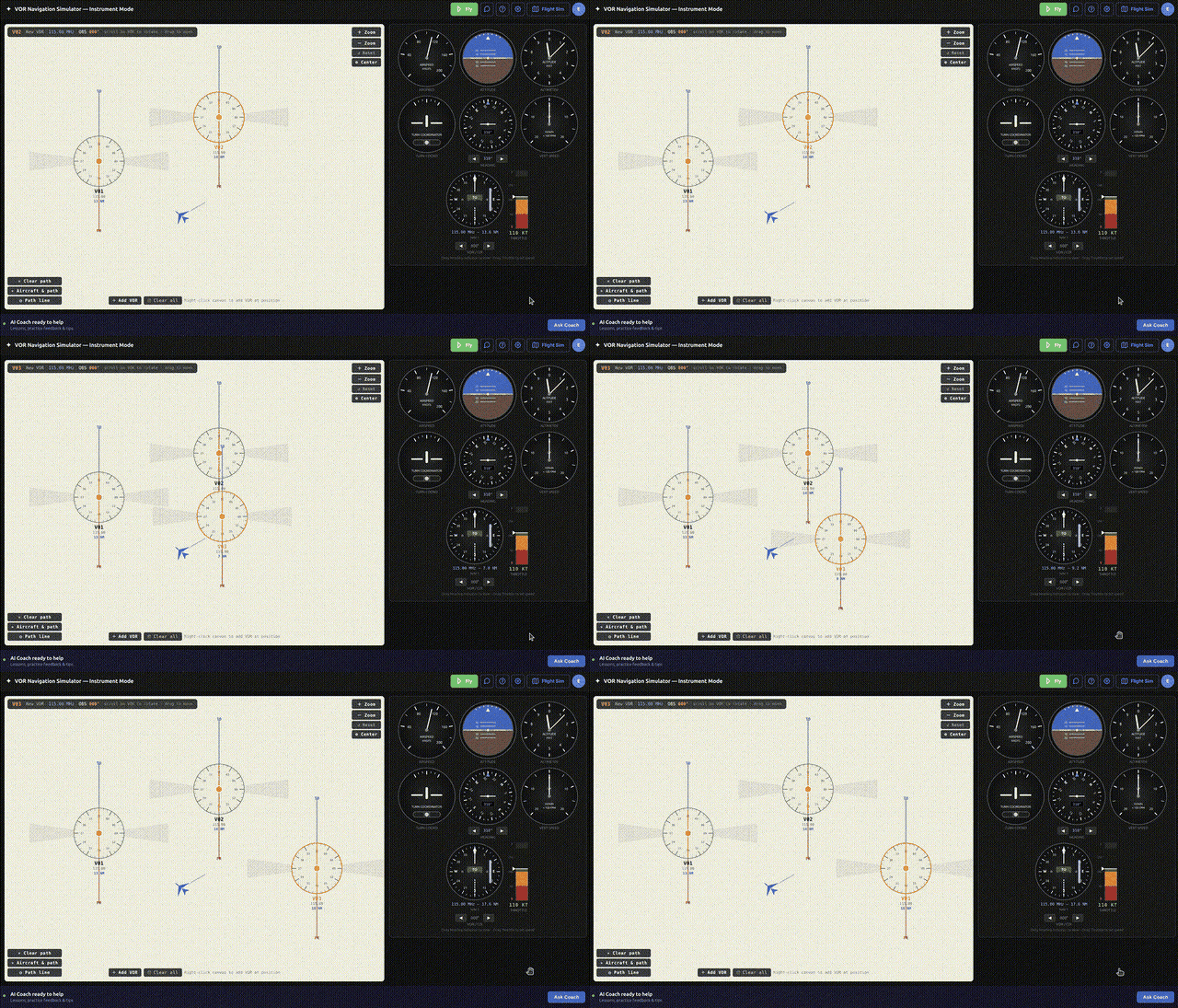
A VOR simulator is a training tool that recreates the VHF Omnidirectional Range (VOR) navigation system on your screen so you can practice the mental and procedural skills of radio navigation without an aircraft, an instructor, or an hour of Hobbs time. Instead of interpreting the tiny needle of a real cockpit indicator while you are also flying the airplane, you get to slow the whole picture down: place VOR stations, position your aircraft, twist the Omni-Bearing Selector, and watch exactly how the Course Deviation Indicator responds.
For most student pilots, VOR navigation is the concept that "clicks" last. The relationship between your heading, the course you have dialed in, the radial you are actually on, and the direction the needle swings can feel like it requires four hands and a spare brain. A good VOR simulator untangles that by letting you see cause and effect directly — move the airplane, and the instruments react in real time.
RadialCoach is a browser-based VOR simulator built specifically for this kind of deliberate practice. It runs an instrument panel with a live VOR indicator and a top-down canvas where you can drag stations and aircraft around, so the abstract becomes visual.
Why Practice VOR Navigation in a Browser
The biggest advantage of a browser-based simulator is friction: there almost is none. There is nothing to install, no license to buy, and no powerful gaming PC required. You open a tab, and you are practicing. That matters because VOR proficiency comes from repetition, and repetition only happens when the barrier to starting is close to zero.
Cost is the second advantage. A single hour of dual instruction in a training aircraft can run well over two hundred dollars, and burning that time drilling OBS twists and needle interpretation is an expensive way to learn a concept you can grasp on the ground. Chair-flying VOR procedures in a free simulator before your lesson means you arrive already fluent in the mechanics, so your paid flight time is spent flying — not decoding the instrument.
The third advantage is repeatability. In the airplane you get one shot at an intercept before the geometry changes and the moment is gone. In a simulator you can reset instantly, try a shallower intercept angle, and see the difference side by side. You can pause, rewind your thinking, and run the same scenario ten times in the span of a single real-world approach.
The Core VOR Skills You Can Drill
Tuning and identifying: Every VOR procedure begins by tuning the station frequency (VORs live between 108.0 and 117.95 MHz) and confirming its Morse code identifier. A simulator lets you build the habit of always identifying before you trust the needle.
Determining your radial: A radial is a magnetic course radiating outward FROM the station, so being "on the 090 radial" means you are due east of the VOR. Practice rotating the OBS until the needle centers with a FROM indication to read your current position — a foundational skill you will use on every cross-country.
Tracking a course: Holding a radial inbound or outbound while correcting for wind is where students lose or gain the most confidence. A simulator with a wind model lets you see how a crosswind pushes you off course and how a small heading correction reels the needle back to center.
Intercepting a radial: Turning to capture a specific course before you reach the station is the maneuver that ties everything together, and it is far easier to learn when you can watch the geometry from above.
Holding and triangulation: More advanced exercises — flying a hold or fixing your position from two VORs — build naturally once the basics are automatic.
How Browser Practice Transfers to the Cockpit
Skeptics fairly ask whether clicking around a web page really prepares you to fly. The honest answer is that a simulator does not build stick-and-rudder skill — but VOR navigation is not a stick-and-rudder skill. It is an interpretation skill. The hard part is looking at a deflected needle and instantly knowing which way to turn, and that translation is exactly what a simulator rehearses.
When you have twisted the OBS and corrected a needle a few hundred times on the ground, the cockpit version stops being a puzzle. Your eyes go straight to the TO/FROM flag, your hand reaches for the right heading, and you stop second-guessing whether the needle is telling you to turn left or right. That automaticity frees up the mental bandwidth you need to actually fly the airplane, talk to ATC, and stay ahead of the aircraft.
Instructors have long encouraged "chair flying" for exactly this reason. A VOR simulator is chair flying with the instrument doing the responding for you, which closes the feedback loop that a paper diagram never can.
VOR Is Not Going Away — Why It Still Matters
It is reasonable to wonder whether VOR is worth learning in the GPS era. It is. The FAA is trimming the network through its VOR Minimum Operational Network (MON) program — decommissioning roughly 307 stations, about 34 percent of the total — but that program deliberately preserves around 589 VORs through at least 2030 as a backup for the entire national airspace system.
The MON exists precisely because GPS can fail. In a widespread GPS outage, the plan is for IFR aircraft to tune and identify a VOR at or above 5,000 feet AGL and navigate VOR-to-VOR along airways, or proceed to an airport within 100 nautical miles to fly an ILS, localizer, or VOR approach. In other words, VOR is the officially designated fallback when satellite navigation goes dark.
Beyond the regulatory reality, VOR knowledge is tested on the FAA knowledge exam and the practical test, and the skills — course interception, wind correction, situational awareness relative to a fixed point — are the conceptual backbone of instrument flying. Learning VOR well makes learning RNAV and instrument approaches dramatically easier.
Getting Started
The most effective way to use a VOR simulator is short, frequent sessions with a single goal. Spend ten minutes determining which radial you are on from random aircraft positions. The next day, drill inbound tracking with a crosswind. The day after, practice intercepts at different angles. Small, focused reps beat one marathon session every time.
Open the RadialCoach instrument simulator, drop a VOR on the canvas, and start twisting the OBS. Watch the needle. Move the aircraft. Within a few sessions the picture that once took four hands and a spare brain will simply make sense — and you will walk into your next lesson already fluent.